04 September 2011

Another valiant attempt to stay organized in a terribly designed rental kitchen

Our rental kitchen is tiny, about 6' by 10'.  But I know from obsessively reading Apartment Therapy that small kitchens can be awesome when used wisely.  For two young people living on a tight budget, six by ten should be plenty.

Somebody else's well-designed tiny kitchen.  Our kitchen was not so lucky.  I want one of those magnetic knife thingies, btw.
Our kitchen, unfortunately, was not used wisely.  It's basically just a box, with our front door at one of the narrow ends, and a door into the living area in the middle of one of the long walls.  Plenty of room to build cabinets and a counter along the long wall, perhaps even a little wrap around counter with a range and oven built in.  An under-counter fridge would maximize the space, but I know I'm dreaming there.  The ceilings are very high, so there is plenty of room to build big cabinets just about everywhere.

Another well designed tiny kitchen that is not mine, from Apartment Therapy.  We have enough room for cheap-o cabinets like these!  Why didn't you put them in!!??
But instead, the "designer" of this kitchen chose a less traveled route, choosing to install one counter-top along the narrow wall of the kitchen.  Beneath this counter-top are the three most awkward cabinet spaces ever, each awkwardly fitted with shelves that don't fit the space.  That's right, some of them don't even hit the back wall of the cabinet, leaving a convenient six inch gap at the back of the cabinet for pots and pans to fall through.
The Bermuda cabinet gap.  Pot lids have no defenses.

And then instead of building in cabinets above the tiny counter, as in the picture above, this mysterious "designer" chose to install a single large cabinet on the wall to the LEFT of the counter-top, making EVERYTHING difficult to get to, even stuff on the bottom shelf.  Then over the sink he or she chose two  narrow open shelves of different sizes.
Why would anyone build a cabinet here????

And I know that an under-counter fridge is dreaming, but was this GIANT of a creature really necessary?

NOM NOM NOM
I could go on about the stupidity of our kitchen, but needless to say we've been up against some organization challenges.  I've tried to fill the open shelving with our prettiest, most colorful dishes.  And because we only have two tiny drawers in the entire kitchen, I hang as many things as possible, and keep silverware out on the counter-top in some ceramic holders we got at Ross.

I like that they have a little picture of the utensil on them, so it looks like I'm keeping utensils on the counter on purpose because I'm so proud of them.
Before I hung this spice rack, I used to keep all the spices in a pile on the counter.  Craziness,!
In the past few days we have further improved the kitchen. In order to stop things from falling through the crazy gap, I bought a giant drawer from the clearance area of the Container Store to "contain" everything on the shelf.

Try getting to my pot lids now, evil gap!
Since we recently got a free coffee maker from a hotel that closed in town, and a gigantic toaster that takes up half the counter, I got rid of the tea and picnic supplies I used to keep on the counter, and relocated them to one of the cabinets.  We also hung a wine glass rack to hang the glasses we got for free after a wine tasting with my family a few weeks ago.  I think it's about time I stop drinking wine out of jars.

Sometimes I think the toaster and the fridge intimidate the tiny little coffee maker and the tiny little stove .  Appliance bullies.

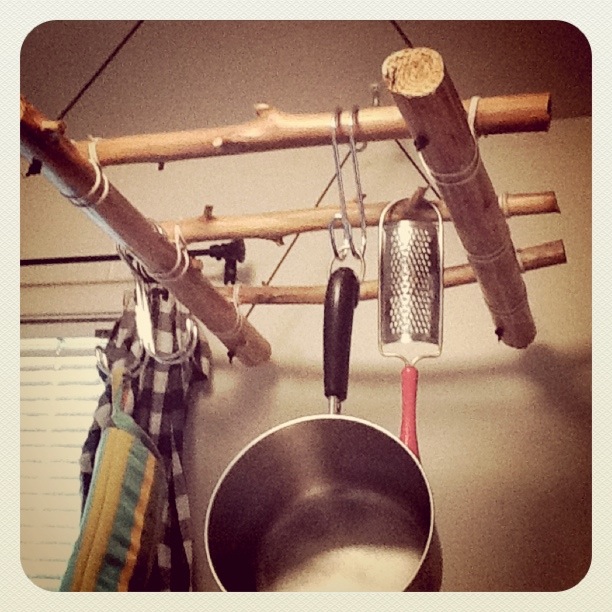
We also built a pot rack from some cut redwood saplings.  I have yet to find the right solution to hang our pots and pans from it (no S hooks big enough at the hardware store, and these tie hangers are too big to fit through the loops of all but this saucepan).  Building the pot rack was a post all of its own, so I'll save that for another time.


Anyhow, it was another valiant attempt to tame the worst designed kitchen in the West (they should give out a prize for that) with zero budget.

Garden Part IV: The Weeding and the Growing and the Waiting

Green peppers.  Waiting for them to turn red because I like 'em that way.
So far, four honeydew melons. Waiting for them to become fragrant so we can pick them.

Eggplants!  They are delicious.  But APPARENTLY they have super intense spikes that hurt really badly when they impale your finger.  You learn something every day...

The garden about two weeks ago (I'm very behind when it comes to posting pictures I take).

Corn.  Waiting for one that's big enough to pick.

We waited a little too long to weed.  This is one day's weed harvest.

Our new outdoor furniture setup (thank you Craigslist).

25 July 2011

Blogging from the iPad is harder than it should be

I'm testing a free iPad blogging app called Monarch, and adding these photos of the garden. Wordpress has a free blogging app, but I can't seem to find a good one for blogger, paid or free. If this works, I will be pleased, because the Blogger site is not fully editable from iOS.

24 July 2011

Garden Part III: The Picking, and the Eating

Starting to look like a real garden!

The chard and kale keep coming, no matter how much we harvest them!

This basil from our garden made an amazing cashew pesto (I had a really bad experience with pine nuts, don't ask)

Our cucumber and our basil, but we had to buy the tomatoes because ours aren't ready yet.  I made cheese again for the first time in over a year, but it's still a little rubberier than I want it to be (it's the white stuff in the top of the picture).  This was the first time I used vegetable rennet and it worked out just fine, so I should get more and start using that.  I also need to order more cultures on the internet.  This caption is turning into a bit of a to-do list for myself, isn't it...

These green beans are so delicious, we haven't had a chance to cook them yet because we eat them all raw before we can get them into the pan.
Oh and while I was in Chicago (I just got back) Chris and Starchild put in a corn-hole court!
We have a little piece of Maryland in our stoop garden now, the state flower: Black Eyed Susan.  I've been experimenting with Instagram, hence the filter.

Sorry I haven't posted in more than a month. Things were crazy there for a while, in one month I was in:

  1. Sacramento (work)
  2. Chicago (data)
  3. Yosemite (for Shirley's wedding!)
  4. Los Angeles (for my mother's birthday)
  5. Chicago (for almost three weeks this time) 
  6. and back to Los Angeles (for a few hours before finally landing back in...)
  7. Northern California

Things are finally slowing down a little bit, as I have two whole weeks of working from home before we go up north for my family reunion in August. Phew!  Here are some more photos of the garden and its bounty.


Happy tomato plant.

Rows of goodness, including some very happy cantaloupes in the back, which I am super pumped about.  Note that this picture was taken AFTER Chris cut back all the chard and kale he is holding in the picture above.

Pretty.  Waiting for me when I got back from Chicago.

25 May 2011

Garden Part II: The Planting, the Watering, and the Sprouting

Our nursery haul.  It seemed like a lot, but only takes up two and a half rows of the bed.

View from the back on planting day.  The poles are for our green beans, which  we planted from seed.

Sweeping off the dirt after planting.  That's basil, and red bell peppers, and chile.

Organized by height, like a school picture!  Beans in the back, then tomatoes and cucumbers, and then all the short little guys in the front.

Strawberries, chard, cantaloupe.

All of these guys sprouted within two weeks!  They are twice as big already, only a few days after this picture was taken.

20 April 2011

Quick Birthday Recap

Thank you to everyone who wished me a happy quarter century!  Facebook makes it kind of overwhelming because all of a sudden you have like 30 messages that you want to respond to, because they are all amazing people, but you can't because there are 30 of them.  In the words of Cathy, Ack! (Right now, I can hear my dad scoffing at me for only having enough Facebook friends to get 30 birthday posts.  I'm sure he'll have at least 500 come his birthday in May).
Despite my Chris-less-ness right now, I had a lovely, low-key birthday. My parents drove up for the weekend, and we packed their 48 hours here with all kinds of fun stuff, like hiking, shopping, eating, drinking, and more eating.  Here is my dad (in his high school varsity letterman's jacket) and me, ordering fancy cocktails from 515 on Cedar.

And the celebrations continued!  My classmate Kristen was super sweet, and brought muffins to class with frosting and a candle on Tuesday.  And then on Thursday I got to celebrate with delicious food and wine with some of my PhD cohort.  So it was really a week of birthday.  Now it's back to business, so off I go into my little work-hole.  Yay for being old enough to rent a car without having to purchase exorbitant insurance packages!

Better than Xanax: The view from my walk to school

I've been fairly overloaded these past few weeks, and despite the fact that Chris is out of town (place frowny emoticon here), it's hard to find a moment where I'm not stressing out about this grant or that paper or this committee or that theoretical framework (or lack thereof) or whatever.  Walking to school, I get a chance to listen to podcasts, admire the view and just think about nothing without feeling guilty about there being something more productive I could be doing.  Because, I mean, I have to get to school, right?  And driving is bad for the world.  Here's the view from halfway through my daily journey (about 3 miles total, and yes, I walk along the bike trail, but I yeild).  How can you look at this and be anxious?

27 March 2011

Homemade iPad 2 case using $7.50 worth of thrift store clothing

I got crafty.  This afternoon I headed down to Goodwill, and picked up a kids polar fleece jacket ($3.75), and a tweed skirt ($3.75).

Tweed skirt and polar fleece jacket
I don't have a sewing machine, so this process took longer than it would have had I driven up to my grandmother's house (which is what I usually do when I have pants to hem, or Cornhole bags to make).  But my mother taught be how to hand sew, at least enough to keep a couple of pieces of fabric together.  A few hours later and voila!  A temporary iPad sleeve with a super soft inside and a stylish outside that will protect my precious gadget from the harsh reality of the outside world.


Doesn't it look cozy in there?  It's not quite done, of course, it needs a button for that cord to hook over.  I plan on getting a button tomorrow (I know, I can't believe we don't have a single button in our apartment either).  This should be plenty of protection for a bevy of upcoming plane flights (a wedding, then work, then more work), and going up to campus.  I will still keep my eye out for the perfect case, but for now I don't have to hurry!

25 March 2011

The iPad 2 finally arrives (and finds a home in a business card holder)


 I got the call on Wednesday evening, and was picking it up at Best Buy seconds after the store opened on Thursday.  Why didn't I pick it up on Wednesday you ask?  I tried, they wouldn't let me.

Just like bringing a baby home from the hospital, this little bundle of joy demanded diapers and a nursery--or at least a protective sleeve and a spot on the desk.  I haven't taken care of the sleeve yet (I plan on getting crafty so stay tuned), but I did learn that a cheap-o business card holder will sub in as a stand, so off to OfficeMax I went.  It turns out none of the business card holders alone could hold up the iPad when it was vertical, so I went with this guy.

Way cheaper than an Apple iPad dock.

It is strong enough to hold the iPad up on my desk vertically and horizontally.

My iPad goes both ways.

And it also holds my desk stuff.

Multi-use!

So I can get rid of my mug-of-pens, leaving my desk looking like this:

Sleek, huh?

So far I am extremely pleased with my purchase.  I had a Skype meeting on it already, which was a breeze, and I purchased QuickOffice (docs, spreadsheets, presentations) and iCab mobile (Safari alternative with tabbed browser and downloads) with a gift certificate to iTunes left over from Christmas. Plus, the iPad is already getting along quite nicely with what is now Chris's iPod touch. Here they are, chatting about being super-skinny, super-sexy gadgets together on the coffee table.

"No you're sexier!"

24 March 2011

Why Evernote has won my heart: An Ode


I'm in love! With a cloud note-taking program that is.  If I love it so much why don't I marry it you say?  MAYBE I WILL.  I'm thinking a summer wedding, so as not to compete with William and Kate's nuptials...


BUT ANYHOW, I have spent the past year (or longer) searching for the perfect cloud replacements for all my go-to software, and I found a lot of good ones.  However, I still hadn't come up with a suitable replacement for MS OneNote.  It was driving me insane.  I rely on OneNote to supplement my infamously spacey memory, as well as satisfy my secret obsession for militant organization and overly-complex filing systems.

In all my searching, Evernote was the only software that came close to doing what I needed.   Last year, I dabbled in Evernote, but hesitated to make the switch for one major reason:  my life was already in OneNote.  Since OneNote files (.one) are totally proprietary, I felt trapped.  Either I painstakingly cut and paste every important note into Evernote, or I stick with bulky, expensive and poorly cloud-integrated OneNote (Yes Gates, I know about MS SkyDrive, and it kinda sucks).  Not to mention the fact that the OneNote syncing and backup process is a total mystery to me, which makes me uncomfortable.

But I recently discovered that in late 2010, Evernote Windows changed my life forever.  Evernote now imports OneNote notes, automatically filing them in a new notebook with the right name, with tags based on their OneNote sections.  AND it doesn't make you find the OneNote files on your computer (which, as I said, I don't understand), it just finds them itself, and then asks you which notes you want from which notebook.  HELLO AMAZING.


Evernote has some other awesome features as well, like the new "Trunk."  The trunk is basically an app store, but for every platform, and also hardware. And all of it interacts with Evernote in some way.  For example, there are several iPad apps (and Blackberry apps, and Android apps, and iPod apps, etc) that will gather information (drawings with a stylus, video recording, pictures of receipts, etc) and send them directly to Evernote.  There are also a list of scanners that can send directly to Evernote, as well as more efficient note managers that sync, and of course the Chrome Evernote Web Clipper Extension and Chrome app.

All of this plus tagging, which is a way more intelligent organizational system than folder.  And a super cool elephant  logo, which is really, really important.  If I'm going to be clicking on an icon almost every day, it better be damn good lookin'.


Thus concludes my confession of love.  Expect the save-the-dates in the mail soon.