27 March 2011

Homemade iPad 2 case using $7.50 worth of thrift store clothing

I got crafty.  This afternoon I headed down to Goodwill, and picked up a kids polar fleece jacket ($3.75), and a tweed skirt ($3.75).

Tweed skirt and polar fleece jacket
I don't have a sewing machine, so this process took longer than it would have had I driven up to my grandmother's house (which is what I usually do when I have pants to hem, or Cornhole bags to make).  But my mother taught be how to hand sew, at least enough to keep a couple of pieces of fabric together.  A few hours later and voila!  A temporary iPad sleeve with a super soft inside and a stylish outside that will protect my precious gadget from the harsh reality of the outside world.


Doesn't it look cozy in there?  It's not quite done, of course, it needs a button for that cord to hook over.  I plan on getting a button tomorrow (I know, I can't believe we don't have a single button in our apartment either).  This should be plenty of protection for a bevy of upcoming plane flights (a wedding, then work, then more work), and going up to campus.  I will still keep my eye out for the perfect case, but for now I don't have to hurry!

25 March 2011

The iPad 2 finally arrives (and finds a home in a business card holder)


 I got the call on Wednesday evening, and was picking it up at Best Buy seconds after the store opened on Thursday.  Why didn't I pick it up on Wednesday you ask?  I tried, they wouldn't let me.

Just like bringing a baby home from the hospital, this little bundle of joy demanded diapers and a nursery--or at least a protective sleeve and a spot on the desk.  I haven't taken care of the sleeve yet (I plan on getting crafty so stay tuned), but I did learn that a cheap-o business card holder will sub in as a stand, so off to OfficeMax I went.  It turns out none of the business card holders alone could hold up the iPad when it was vertical, so I went with this guy.

Way cheaper than an Apple iPad dock.

It is strong enough to hold the iPad up on my desk vertically and horizontally.

My iPad goes both ways.

And it also holds my desk stuff.

Multi-use!

So I can get rid of my mug-of-pens, leaving my desk looking like this:

Sleek, huh?

So far I am extremely pleased with my purchase.  I had a Skype meeting on it already, which was a breeze, and I purchased QuickOffice (docs, spreadsheets, presentations) and iCab mobile (Safari alternative with tabbed browser and downloads) with a gift certificate to iTunes left over from Christmas. Plus, the iPad is already getting along quite nicely with what is now Chris's iPod touch. Here they are, chatting about being super-skinny, super-sexy gadgets together on the coffee table.

"No you're sexier!"

24 March 2011

Why Evernote has won my heart: An Ode


I'm in love! With a cloud note-taking program that is.  If I love it so much why don't I marry it you say?  MAYBE I WILL.  I'm thinking a summer wedding, so as not to compete with William and Kate's nuptials...


BUT ANYHOW, I have spent the past year (or longer) searching for the perfect cloud replacements for all my go-to software, and I found a lot of good ones.  However, I still hadn't come up with a suitable replacement for MS OneNote.  It was driving me insane.  I rely on OneNote to supplement my infamously spacey memory, as well as satisfy my secret obsession for militant organization and overly-complex filing systems.

In all my searching, Evernote was the only software that came close to doing what I needed.   Last year, I dabbled in Evernote, but hesitated to make the switch for one major reason:  my life was already in OneNote.  Since OneNote files (.one) are totally proprietary, I felt trapped.  Either I painstakingly cut and paste every important note into Evernote, or I stick with bulky, expensive and poorly cloud-integrated OneNote (Yes Gates, I know about MS SkyDrive, and it kinda sucks).  Not to mention the fact that the OneNote syncing and backup process is a total mystery to me, which makes me uncomfortable.

But I recently discovered that in late 2010, Evernote Windows changed my life forever.  Evernote now imports OneNote notes, automatically filing them in a new notebook with the right name, with tags based on their OneNote sections.  AND it doesn't make you find the OneNote files on your computer (which, as I said, I don't understand), it just finds them itself, and then asks you which notes you want from which notebook.  HELLO AMAZING.


Evernote has some other awesome features as well, like the new "Trunk."  The trunk is basically an app store, but for every platform, and also hardware. And all of it interacts with Evernote in some way.  For example, there are several iPad apps (and Blackberry apps, and Android apps, and iPod apps, etc) that will gather information (drawings with a stylus, video recording, pictures of receipts, etc) and send them directly to Evernote.  There are also a list of scanners that can send directly to Evernote, as well as more efficient note managers that sync, and of course the Chrome Evernote Web Clipper Extension and Chrome app.

All of this plus tagging, which is a way more intelligent organizational system than folder.  And a super cool elephant  logo, which is really, really important.  If I'm going to be clicking on an icon almost every day, it better be damn good lookin'.


Thus concludes my confession of love.  Expect the save-the-dates in the mail soon.

19 March 2011

What if Google ruled the World?


I have ranted before about how wonderfully Google keeps track of my mail, contacts, to-do lists, blogs, calendars, etc.  I have even wished that Google might extend its magic to the parts of my life that are less well taken care of: GCarRepairs perhaps? GPhD? GHangover?

Spanish artist Alejo Malia has taken the liberty of imagining a world where Google's presence has moved from cyber to physical, dominating our streets, and even visible to astronauts in space.


Whether these images are meant to celebrate Google's awesomely-efficient organisational tools for our everyday lives, or creepily ever-growing presence in every aspect of our existence, I'm a fan.

Street Name "Google's World"

13 March 2011

Decision 2011: I'm getting an iPad (2)

I have obsessed over portable cloud-ready devices that I can keep in my purse for long enough.  It is time for me to make a purchase.  And the decision is... (click play below for the drum-roll)


iPad 2!


You may be surprised to hear this (unless you read the title of this post).  I have never been a Mac junkie.  I pledged my loyalty to Microsoft long ago.  And in fact, my first impulse was to get a netbook.  But there were a couple of things holding me back from committing to the netbook.

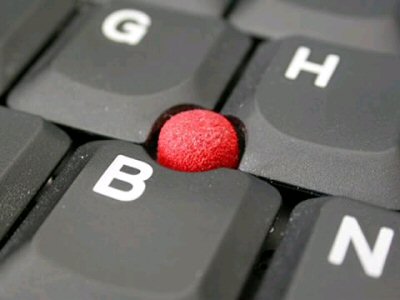
First, the nipple.  I've said it before, but I hate touchpads.  I love trackpoints.  When I asked the guy at Best Buy if there were any netbooks with these eraser-head pointing devices he said "those things that were on the old ThinkPads?  They haven't made those for years."  First of all, he is clearly dead wrong.  Several big laptop companies still include nipples on all their normal-sized laptops (Lenovo and Dell, for example).  Second of all, the nipple is clearly the superior pointing device, as it allows manipulation of the cursor without having to lift one's fingers from the keyboard.  So that guy can go jump in a lake.


But I digress.  The point is only one netbook includes a nipple, and it is the Sony Vaio P.  The Vaio P, simply by virtue of being made by Sony, is prohibitively expensive (~$1000), especially among netbooks, which typically range from about 200-400 bucks.  Sony claims it is not a netbook, just a small laptop, but give me a break.  It's a netbook.

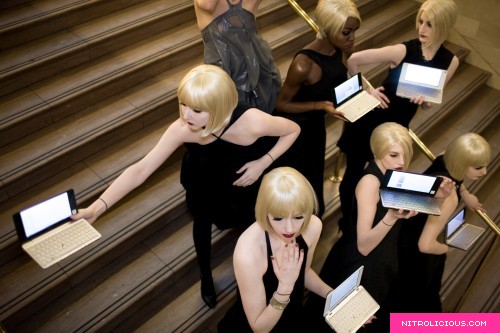
Sony Vaio P display at Grand Central Station

As for weight, most netbooks really aren't that light.  The smallest netbook is (sigh) the Sony Vaio P.  And guess why they can cut out so much weight?  Because by adding a nipple and getting rid of the touchpad, they could cut off all that extra stuff below the keyboard!  It all comes back to the nipple.

Before you go thinking that the Sony Vaio P would be perfect and I should just save up for one or get financing or something, the P is not perfect.  Its tiny keyboard is apparently difficult to type on, and it's tiny screen is difficult to read on. Since one of my major impetuses for purchasing something is for reading PDFs and traveling, this is a big deal.  Not to mention the fact that nipples have been linked to major finger joint problems (I've probably already done too much damage to reverse).

To be honest, my 3 year old ThinkPad is about as small and light as a laptop gets, so getting a netbook really  just seems redundant.  I would just be getting a crappier computer than I already have to shave off a little weight.  I want to shave off weight while expanding my computing capabilities, rather than replicating them.  I want something that can do things my ThinkPad can't.  Like be at my disposal on the bus instantly.  Or last 10 hours without having to be plugged in.  Or turn into a piano.  All while still letting me surf the web, read PDFs and books, Skype, blog, and take notes in class.


Let's go over a few of the iPad's downsides and why they aren't downsides at all:

No physical keyboard?  No problem! I took one out from the library last week, and it turns out I can touch type on it like a maniac! I'm not saying I'm going to write my whole dissertation on it, but if I want to bang out a chapter or two on a flight to Maryland, no biggie (yes, I can write 60 pages in 6 hours shush).

No file system?  No problem!  If you think that I'm a fan of saving data locally, you clearly have never read this blog, or talked with me for like fifteen minutes.  Pages (Apple's touch word processing program) integrates with Dropbox, as do several other common apps.  Having no files system will only accelerate my move to the cloud.


No Flash?  No problem!  I have already figured out how to play Flash on my iPod touch using something called  iOS Flash Video.  There are also several iOS web browsers out there that can play Flash, and that also allow downloads and tabbed browsing, unlike Safari.

As for the lack of USB ports, I have no excuse for Apple here.  Now what am I going to do with all my awesome food themes USB sticks???  What the heck is wrong with you Jobs????  You popularized it, now use it!!!!!


It's okay iPad, I forgive you.  Did I mention it comes in white?

29 January 2011

Community Garden: Destroying the Junkie Den


We've been talking with our landlord for some time about the possibility of taming our backyard, and things are finally coming together.  The man who manages the property just to the west has experience in agroecology and the likes, and we have agreed to make a community garden shared between the two properties, in an old dog kennel that was previously occupied by a tangled nest of cyclone fencing and ivy that served as a den for a group of junkies.  Today marked Stage 1 of the project: clearing out the kennel and hauling out foliage.

The old dog kennel, about 3/4 of the way through clearing out the nest.
One of our first tasks was to figure out where the property line is between us and the Valero next door.

A lovely view to our Valero neighbors.
My landlord downloaded a metal-detecting app on his Droid and amused us all by trying to find the survey stake by running his phone over the ground for several minutes before giving up. A real metal detector managed to pick up about ten screws of various sizes, but no survey stake yet. No treasures either (sigh).

Yup, there's an app for that!  No guarantee it works though.

 Today we focused effort on getting rid of the nesting materials, clearing out nail studded boards and salvaging coiled lengths of chicken wire from invasive foliage.  Luckily the man who owns the property next door cleared out the syringes several months ago, so we a had slightly less disgusting mess to contend with.

Look at this mess.

Our friend from Astrocamp days yanking old-growth redwood boards off of the dog-kennel foundation.
This morning when we ripped out an old tree, it revealed a lovely view to the Valero bathroom, so we've been brainstorming ways to get our privacy back in a nice way.  We're thinking of putting up the old chicken wire and then growing Asian Jasmine up it.  Aromatic, drought-resistant and fast-growing: sounds perfect.
View to the Valero bathroom.
The destruction of the tree also devastated a volunteer Calla Lily, so the flowers ended up in our living room in an old pickle jar.

So pretty!  They grow like weeds around here.
Meanwhile my little garden is loving the weeks of heavy rain followed by long stretches of sunshine.

My excitement for saving the seeds from my food will hopefully pay off now that we have a vegetable garden, as they never seem very happy in these tiny little pots.  This came from a butternut squash we had for dinner.

The orchid our ex-neighbor gave us is about to bloom!

The euphorbia is super-pumped about the sunny weather.  I love gopher-proof plants!

So goes Stage 1 of the community garden project.  We're hoping to get seeds in the ground in the next few weeks, so we can start harvesting in late Spring.  Fresh vegetables! Every day!  I can't wait.

11 January 2011

Things to do with your books now that you have a Kindle

I don't have an e-reader, but I assume you, my sophisticated, cloud-ready reader, probably do.  So what do you do with all those piles of books sitting around?  You can hoard them, as I do, ignoring your boyfriend's pleas to downsize.  Or you can get creative, like these folks:

Juniper Books Christmas tree from Museum Muse.


Headboard from Instructables, featured on Ohdeedoh.


Desk from Delft University of Technology, featured on PhDAZZLE.


Reader's table from This Into That.


Book page vases from Country Living

.

06 December 2010

Beautiful photographs of observatories

Astronomers build their observatories in the most remote places in the world, often high above the heat and lights of civilization, where the air is still and clear. Consequently, a tour of world observatories would bring you to some of the most beautiful vistas on Earth, from glittering European mountain peaks, to tropical paradises. Here are some of my favorite scavenged photos of observatory domes from around the world.

My hometown observatory, Griffith, looking down over the sprawl of Los Angeles.

Sphinx Observatory perched high in the Alps.

The dome of the 36-inch at Lick Observatory on Mt. Hamilton in California, framed by what look like Mariposa lilies.  Taken by Laurie Hatch.

Another photograph of Lick, the 120 inch dome, by the talented Laurie Hatch.

Mauna Kea (White Mountain) Observatory, Hawaii, HI.  Those are the two Kecks in the center, and I think the one on the left is Gemini.


Blackrock Castle Observatory in Cork, Ireland.  See the dome peeking up out of that castle tower?

El Caracol, also known as "The Observatory," at Chichen Itza, Mexico.  Thought to have been used by the Mayans to observe the cosmos.

13 November 2010

Support the Miracles of Modern Science (MOMS)!!!!!!


Click here to support an amazing band that I just randomly discovered on the internet. They're called the Miracles of Modern Science.  Okay fine, I'll admit it, the members started out playing at my eating club at college, and I know them, and I am particularly fond of the violinist.  But they make seriously awesome music (rock with no guitars!) and they need support to produce their first real album.  The website this is through, Kickstarter, is a brilliant idea.  You can pledge money through Amazon (any dollar amount), but your credit card doesn't get charged unless the project gets fully funded.  And you get rewarded for pledging different amounts.  I would be happy to pay 25 bucks for a kick-ass CD (which is the reward for a $25 pledge).  So anyhow, go to Kickstarter now and pledge a few bucks for the MOMS. WNYC called their music "Exuberant chamber pop that waxes and wanes with elaborate, rocky energy.” How can you say no to that???

11 November 2010

Real Sexy Scientists Prefer Socks: A Belated Halloween Post

I did another Google image search, this time for "scientist" themed Halloween costumes.  Unsurprisingly, the majority of masqueraders were "mad," and male. The first page of results revealed only three females dressed as scientists:


Surprised by the amount of leg they're showing around toxic chemicals?  I doubt it.  Needless to say, the male majority of the results were not as sexy:


Although some were pretty adorable:


There are a variety of costumes that represent real professions: firefighters, cops, soldiers...  Granted, women have managed to make all of these costumes "sexy."  God forbid a woman dress up for Halloween and not be wearing thigh high boots:

Can you really fight fires in that?  Whatever.  I get it.  It's a day where you're allowed to dress provocatively without being unfairly labeled. In college, I was a "sexy train" one year.

I defy you to find a sexier train.  But let's talk about the non-sexy costumes. Why aren't any of them accompanied by a stereotypical psychological state, like "mad?"  Nobody dresses up as a "sad cop," or an "impatient soldier."  In fact, most of the fake men-in-uniform seem to be perfectly normal human beings:


Just once, I would like to see someone dressed as a perfectly rational scientist, his or her hand on the shoulder of another perfectly rational scientist, as they work together in the collaborative human effort we call "science."  Also just once, I would like to see a fake scientist who can be sexy without having to wear garters into the imaginary lab, because real sexy scientists tend to prefer socks.

Just for reminiscing's sake, and to prove that I didn't always just sit around and complain about stereotypes all day, here is the full group of "sexy women in uniform" from 2006: